
The Top 8 BYOD Security Risks You Should Be Prepared to Handle
Uncover critical BYOD risks in the workplace and discover protective strategies to secure personal devices effectively.

As businesses strive for flexibility and efficiency, the practice of “Bring Your Own Device” (BYOD) has become increasingly common. According to a report by Techjury, 59% of organizations allow employees to use their own devices for work purposes.
However, this convenience comes at a cost: it significantly amplifies the vulnerability of business networks to security threats.
As Eric Woodard, CEO at Protek Support, says, “BYOD can be a double-edged sword, offering flexibility yet inviting significant security risks.”
These BYOD security risks not only jeopardize the integrity of corporate data but also expose businesses to severe compliance and financial risks. Understanding and mitigating these threats is crucial for maintaining the security of sensitive information.
1. Data Leakage
Personal devices often lack stringent security measures, which heightens the risk of exposing sensitive business information through insecure networks or applications.
Accidental data leaks can lead to significant breaches, causing financial losses and long-term reputational damage to the business. Helpnet security reported that 63% of respondents say data leakage is amongst the biggest BYOD. concern
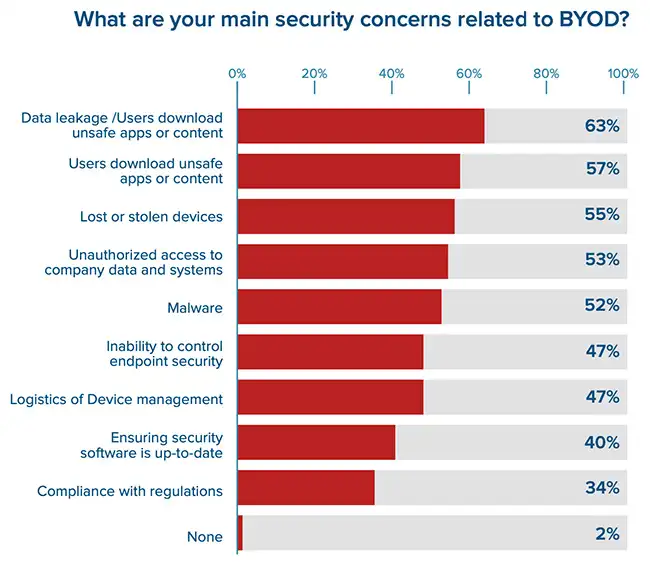
Source: HelpNet
2. Lost or Stolen Devices
Personal devices are highly susceptible to loss or theft, especially when used outside the office. If these devices fall into the wrong hands without adequate security, sensitive company data can be accessed, resulting in potentially catastrophic security breaches.
Don’t be Afraid of Losing Control Over Corporate Information
Gain back control with Protek Support's advanced device management systems.
3. Malware Risks.
Personal devices are more susceptible to malware infections if employees download applications from unofficial sources or browse insecure websites. In fact, a report by Cybersecurity Insiders shared that 22% of organizations report that malware has been downloaded onto employees’ BYOD devices.
Such malware can infiltrate corporate networks when the device connects back, potentially leading to widespread data theft and disruption of business operations.
4. Compliance Issues
Adhering to regulatory compliance becomes complicated with BYOD because personal devices might not align with the stringent security protocols necessary for certain types of sensitive data. Non-compliance risks include legal ramifications and hefty fines, which can tarnish a company’s market standing and customer trust.
5. Mixed Personal and Corporate Data
BYOD policies often lead to personal and corporate data coexisting on the same device, complicating data management and increasing security vulnerabilities. This scenario poses significant risks when attempting to segregate or delete corporate data, especially when an employee departs from the company.
6. Patch Management
Ensuring that all personal devices in a BYOD setup are regularly updated with the latest security patches is challenging. Failure to promptly update devices can leave known vulnerabilities unaddressed, making it easier for cyber attackers to exploit these weaknesses.
7. Network Security Threats
When employees connect their personal devices to the corporate network, they introduce a pathway for potential security threats. These devices, often connected to other less secure networks, can serve as entry points for hackers, endangering the entire network’s security and facilitating unauthorized access to sensitive data.
8. Resource Mismanagement
Implementing BYOD increases the complexity of IT management as resources must be allocated to monitor and secure various personal devices. This diversification can strain IT departments, leading to inefficient use of resources, potential oversights in security measures, and increased operational costs for the company.
Effective BYOD Security Measures
1. Mobile Device Management (MDM) Solutions
Implement mobile device management solutions to oversee all personal devices connected to the corporate network. MDM allows for the enforcement of security policies, remote wiping of data from lost or stolen devices, and installation of necessary updates to maintain device security and compliance.
2. Use of Encryption
Enforce strong encryption for data at rest and in transit to protect sensitive information regardless of the device’s security standards. Encryption ensures that even if data is intercepted or accessed without authorization, it remains undecipherable and secure from unauthorized use.
3. Secure Connections
Mandate the use of Virtual Private Networks (VPNs) for all connections to the corporate network. VPNs encrypt data traffic, creating a secure tunnel for transmitting sensitive information and significantly reducing the risk of interception by malicious actors.
4. Regular Security Training
Conduct regular security awareness training for all employees to highlight the importance of security best practices for BYOD. Training should cover topics such as secure password habits,, proper handling of corporate data on personal devices and recognizing phishing attacks.
This is especially for critical small businesses as CloudSecureTech reports that small businesses face 350% more phishing attacks than larger companies, underscoring the increased vulnerability in less fortified environments.
5. Biometric and Multi-factor Authentication
Implement biometric security measures and multi-factor authentication for accessing corporate data. This adds layers of security by requiring additional user identity verification, significantly reducing the risk of unauthorized access due to stolen or weak passwords.
6. Strict Usage Policy
Develop and enforce a clear BYOD policy that outlines acceptable use, security requirements, and the responsibilities of employees. This policy should include guidelines on which types of apps are permissible, how data should be stored and shared, and the consequences of non-compliance.
Comparison of BYOD Policy Enforcement Tools
This table illustrates different technologies that enhance the security and management of BYOD environments by addressing specific aspects of device and network security. Each technology offers unique benefits for safeguarding corporate data in diverse operational contexts.
Overcome BYOD Risks with Protek Support
While BYOD offers numerous benefits in terms of cost savings and employee satisfaction, the associated security risks pose significant challenges.
Businesses must adopt strategic, comprehensive security measures to protect their networks and data. Protek Support specializes in fortifying corporate networks against BYOD risks, offering tailored solutions that safeguard sensitive information.
Contact us today to schedule a free consultation and ensure your business is protected against the complexities of BYOD.
Get a free IT assessment
Tell us a little about your team and what you need, and we'll reach out.
- Rated 4.9 on Google by Utah businesses
- 24/7/365 support when something breaks
- Local team based in Sandy, Utah