
Everything There Is To Know About AI in IT Service Management
Whether or not people would prefer to call a human IT technician for support has mixed results. 1 in 2 people say that they would rather speak to a human...

Whether or not people would prefer to call a human IT technician for support has mixed results. 1 in 2 people say that they would rather speak to a human IT support agent than a chatbot, yet 73% of people say they would prefer self-service options (like a chatbot) over speaking to a human support agent. This seemingly contradictory evidence speaks to the need to combine human-led IT support with efficient AI in IT service management.
Furthermore, there is the cost factor. CloudSecureTech estimates that the average annual cost of maintaining an in-house IT support team is $313,260. Supplementing support with AI resources can be a way to reduce costs, but this must be done carefully.
That’s because AI can make errors, mishandle sensitive information, and fail to meet compliance rules without strong human review. Too many of these mistakes can cost your business more money in the long run.
For these reasons and more, this blog will provide you with an introduction to using AI for IT support. We will explore when the best time to do so is, how you can mitigate the biggest risks, and key best practices for rolling out an AI-powered IT support system.
When Is The Best Time to Use AI For IT Support?
The best time to use AI for IT support is when speed, consistency, and scale matter. AI works best for high-volume tasks, simple troubleshooting, and first-line response, where fast resolution improves user experience. Here are some common best use cases.
1. High-Volume, Repetitive Support Requests
AI works best when users submit the same types of tickets over and over. These include password resets, account access issues, and basic software questions. Virtual agents resolve common service desk requests faster than manual triage and may reduce ticket volume.
2. Outside Normal Business Hours
If agents aren’t on shift 24/7, an AI IT helpdesk may be able to help fill in those gaps. This keeps users productive and prevents ticket backlogs from forming overnight. While AI agents can be helpful, some companies also outsource additional support staff to fill in time after hours as needed.
3. At The First Stage of Triage
AI performs well when it handles the first step of problem analysis. It can classify tickets, suggest likely causes, and route issues to the right human agent as needed. Early-stage automation speeds up resolution by removing delays caused by manual sorting and prioritization.
4. When Users Need Fast Self-Service Answers
AI support is ideal when employees want immediate help without opening a ticket. Knowledge-based AI tools search documentation and return direct answers in plain language. AI systems may also be able to surface relevant help articles or guidance that reduce the number of tickets needed in the first place.
What Are The Risks of an AI IT Helpdesk?
1. Limited Transparency
AI helpdesks often give answers without showing how they reached them. As a result, IT teams cannot easily trace why the system made a certain choice. This makes reviews and investigations harder when problems affect users or systems. You can reduce this risk by using AI tools that record actions and keep full ticket histories and by requiring human approval for certain actions.
2. Integration Challenges
AI helpdesks depend on tight connections with ticketing tools, identity systems, and device management platforms. Incomplete integrations can lead to lost context, wrong routing, or stalled workflows. You can mitigate this by testing integrations in phases and limiting early automation to read-only or low-impact tasks.
3. Outdated Knowledge
AI systems depend on current documents and past tickets. If your workflows change while your key knowledge bases stay the same, the AI may advise on something outdated.
This risk can be reduced by reviewing knowledge content on a regular schedule. Training data should be updated when tools or rules change, and technicians should be able to flag incorrect answers so the system can improve over time.
4. Biased Ticket Handling
AI learns from old service data. Historical data can reflect uneven support patterns across departments or roles. If the AI IT helpdesk sees that, it may favor certain users or issue types based on what or who is most commonly detected in the data. This can be mitigated by auditing training data and testing outputs across user groups.
5. Service Interruptions
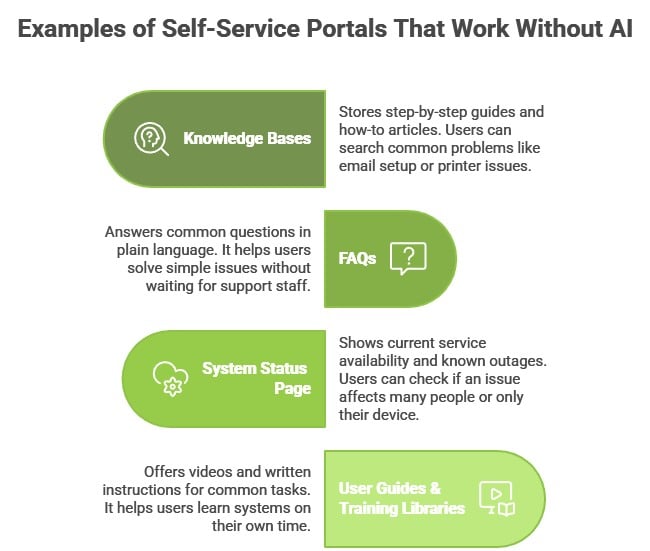
AI helpdesks rely on cloud services and system uptime. This could be a problem if an outage blocks the main support channel during busy hours. It’s possible to reduce this risk by keeping human support as a backup option. Also, maintain basic self-service portals that work without AI.
Are IT Technicians Still Necessary If AI Is Used For IT Support?
It’s best to maintain some human IT support staff even with an AI IT helpdesk. If it is not feasible to hire or maintain an in-house team, outsourcing your IT support is also a good option. Outsourcing additional support agents may also be useful if an organization’s in-house IT support team is small and their AI systems aren’t enough to complete all of the requests needed. Protek has a Co-Managed option to help with this scenario.
Protection Against Prompt Injection in AI-Driven Service Management
When using AI for service management, user input should be treated as untrusted content. Systems should be designed to prevent AI models from executing hidden or malicious instructions embedded within prompts that attempt to override their intended role or operational constraints.
Effective mitigation strategies include implementing controls that restrict tool access, enforcing role boundaries, and validating AI outputs before they are accepted or passed to downstream systems. Output review and verification processes help reduce the risk of compromised workflows.
Given that prompt injection attacks have been observed to achieve high success rates (reported as high as 94.4%), organizations are advised to adopt a cautious, defense-in-depth approach to AI governance and system design.
How Does Protek Use AI For IT Support?
Protek provides an AI IT helpdesk powered by Thread. Instead of waiting on long email chains or filling out complex forms, you start a conversation directly with our chat agent right from Teams. The moment a request comes in, Thread’s AI reviews the message, identifies the issue type, and sets the right priority level. This process helps our team respond faster.

Even though Thread is AI-powered, Protek’s technicians still lead your support experience. The AI handles early steps like sorting requests, gathering details, and documenting the interaction in the background. Each conversation connects to Protek’s service system, which records activity automatically.
This approach improves visibility and consistency across support requests. Your employees can ask for help in a familiar chat format, and Protek receives the context needed to act quickly. The result is a more responsive service desk that supports daily operations without adding complexity.
Count on Experienced Human Experts to Work Alongside Your AI IT Helpdesk
Using AI for IT support has its benefits, but it cannot replace the expertise of experienced IT professionals. It’s tempting to roll out a singular AI helpdesk instead of hiring or outsourcing human agents, but this mistake may cost you in the long term.
If you’re struggling to find human experts to help manage your IT support processes, you can count on Protek. Our team is focused on being proactive, so we will always dig into the root of any problem and help both you and any AI agents you use avoid the same issue again.
Contact us today to learn more about what we can do!
Get a free IT assessment
Tell us a little about your team and what you need, and we'll reach out.
- Rated 4.9 on Google by Utah businesses
- 24/7/365 support when something breaks
- Local team based in Sandy, Utah